 Excel Link Rescue
External links in .xlsm files
Workbook links in a macro-enabled file behave exactly like those in an .xlsx file, and Excel repoints them the same way. What changes is the cost of a mistake: an .xlsm also carries a VBA project, and that is the part you want to be certain survived the repair.
Links in an .xlsm are ordinary workbook links
A formula in a macro-enabled workbook that reads from another file stores the same kind of reference as any other workbook. Excel's Change Source works on it in the same place, either the Workbook Links pane on the Data tab in current Microsoft 365 builds or Edit Links in older versions.
Changing a link source in Excel does not remove your macros. If that were a normal outcome, nobody would use the feature. The caution around .xlsm files is not about Excel's own command.
Where the caution comes from
It comes from everything else that rewrites the file. An .xlsm is a package of parts, one of which is the compiled VBA project. Any process that opens the workbook and writes it out again can rewrite parts it did not need to touch. Saving through a different application, converting the file, or a script that rebuilds the workbook to change a path can all produce a file that opens correctly and has a VBA project that is no longer byte for byte what you started with.
That is worth being careful about when the macros are the reason the workbook exists, and it is the reason Excel Link Rescue checks the VBA project explicitly rather than assuming it came through.
Repairing the links and checking the result
The repair modifies only the parts of the package that contain the link targets. Everything else is copied across unchanged. After the new file is written, it is verified, and the VBA project is one of the things verified.
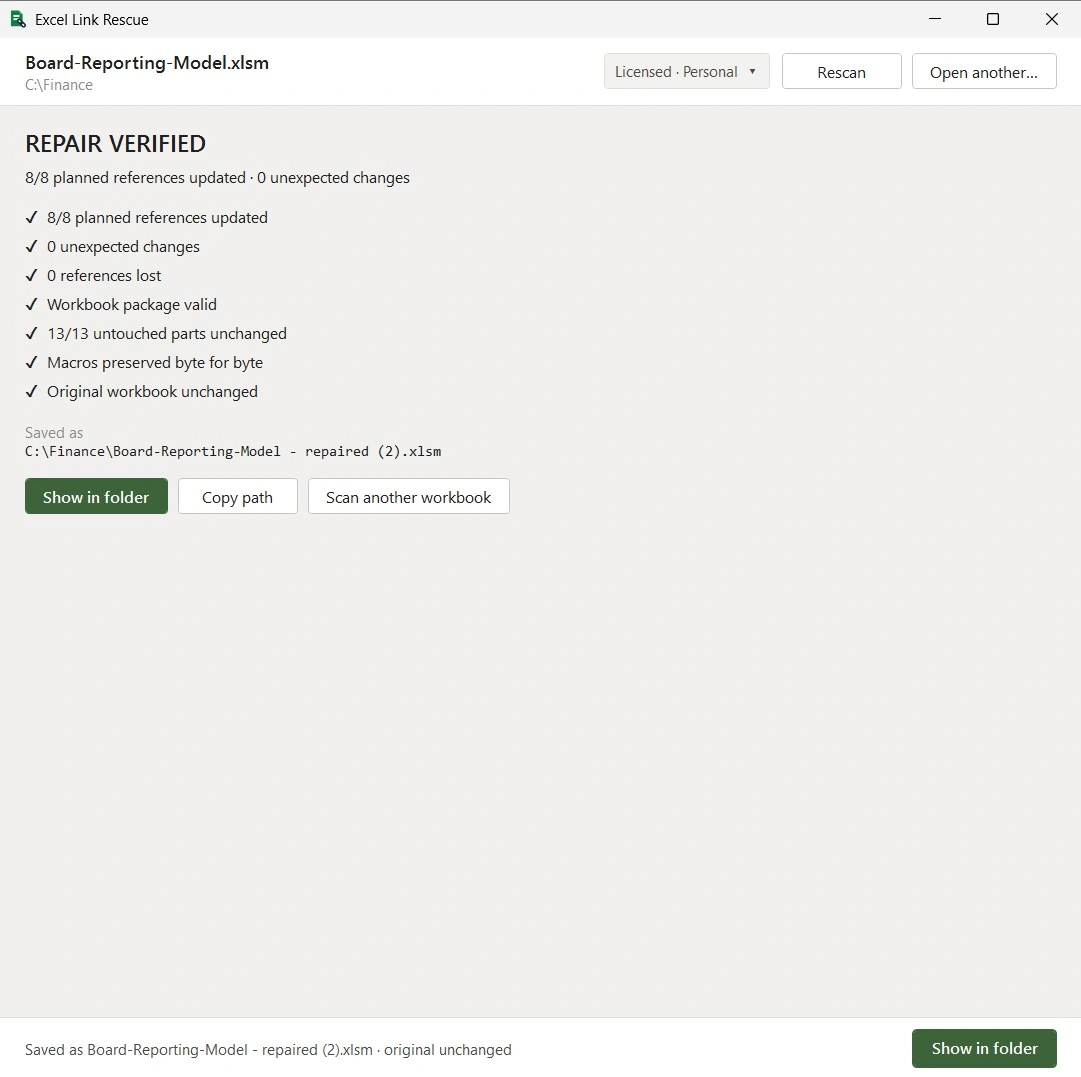
The checks reported there are literal:
- 8/8 planned references updated. Every reference the preview said would change did change.
- 0 unexpected changes. No reference changed that was not in the plan.
- 0 references lost. The repaired file has the same set of references, minus the intended edits.
- Workbook package valid. The file structure is intact and can be reopened.
- 13/13 untouched parts unchanged. Every part of the package that had no reason to change is identical to the original.
- Macros preserved byte for byte. The VBA project in the repaired file is identical to the one in the original.
- Original workbook unchanged. The file that was scanned was not modified.
If any of these fail, the repaired file is discarded. You are told the repair did not pass rather than handed an output that looks finished.
What is not covered
Paths written inside VBA code are a different thing from workbook links. If a macro builds a file path in code and opens a workbook that way, that path lives in the VBA project, not in the workbook's link entries. Excel Link Rescue does not modify VBA code, which is what makes the byte for byte check possible. A hard-coded path in a macro has to be updated in the VBA editor.
Questions
Can I repair external links in an .xlsm file without removing the macros?
Yes. The repaired file is written as a new .xlsm and the VBA project is verified to be byte for byte identical to the original.
Will changing external links in Excel delete my VBA macros?
No. Excel's Change Source command repoints the link and leaves the VBA project alone. The concern with macro-enabled files is other tools that rewrite the whole workbook, not Excel's own command.
Does the repaired file stay macro-enabled?
Yes. It is written as an .xlsm with the same VBA project. The file is not converted to another format.
What about file paths hard-coded inside a macro?
Those are part of the VBA code and are not workbook links. They are not modified, and they need updating in the VBA editor.
Is .xlsb supported?
No. This version works with .xlsx and .xlsm files.
Check a macro-enabled workbook
Scanning an .xlsm and previewing the repair are free. The verification results shown above are produced by the repair itself, so you can confirm them on your own file.
Download Free