 Excel Link Rescue
Change the source of an Excel workbook link
Changing the source repoints an existing reference at a different workbook and leaves the formula itself alone. Excel does this from the workbook links pane. If several sources are involved, or you want to see the change before it happens, that is where a dedicated tool helps.
What Change Source actually does
Every external reference stores two things: where the source workbook is, and what to read from it. The sheet name and cell addresses are the second part. Change Source rewrites only the first.
A formula reading ='C:\Finance\2025\[Expenses.xlsx]Summary'!$B$4 repointed to a copy of
Expenses.xlsx in a different folder becomes
='C:\Finance\demo\[Expenses.xlsx]Summary'!$B$4. It still reads cell B4 of the Summary
sheet. Excel applies the change to every reference that used the old source, not just the cell you were
looking at.
The new workbook does need to have the sheet and cells the formulas ask for. Repointing at a file with a different sheet name gives you a reference error, because the location is now valid but the thing it asks for is not there.
Change the source in Excel
Where this lives depends on your Excel version. In current Microsoft 365 builds, open the Data tab and choose Workbook Links in the Queries and Connections group, which opens a pane listing each linked workbook. Older versions show the same list in the Edit Links dialog on the Data tab.
- Open the workbook that holds the reference.
- Open the workbook links pane or the Edit Links dialog.
- Select the source workbook you want to repoint.
- Choose Change source and pick the file.
- Let the values update, then save.
Seeing the change before it is made
Excel applies the change straight away to the workbook you have open. That is fine when you are certain which file is correct. It is less comfortable when a folder was reorganised some time ago and there are three plausible copies of the source, or when the workbook is one other people use.
Excel Link Rescue takes the same action but shows it first. You pick the replacement file, and the old and new paths are displayed together with the number of references that will change.
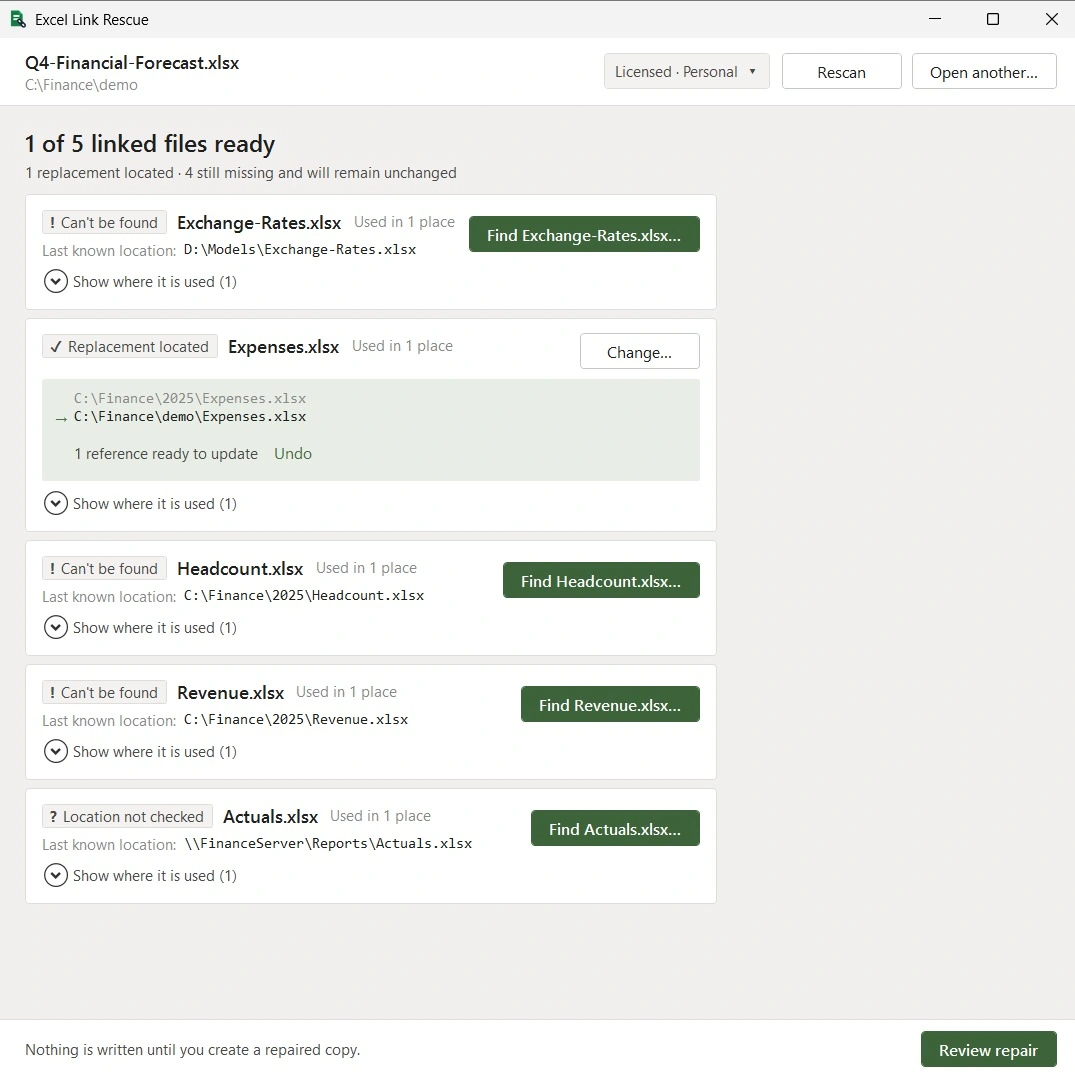
Nothing is written at that point. The repair creates a new workbook and leaves the original file exactly as it was, which means an incorrect choice costs you the time to redo it and nothing else.
More than one source to change
Each source is repointed separately, in Excel and in Excel Link Rescue alike. The difference is that you locate all of them first and review the whole set in one screen before the repair runs. That is covered in changing multiple link sources.
If the reason for the change is that files were moved or a folder was reorganised, see fixing links after moving files, where the old and new locations follow a pattern.
Changing a source is not the same as breaking a link
Excel's Break Links command replaces the linked formulas with the values they hold at that moment. The workbook stops depending on the other file, and the formulas are gone. That is useful when sending a workbook to someone outside your network, and it is not reversible by relinking.
Change Source keeps the formulas and corrects where they point. Excel Link Rescue only does the second. It does not break or remove links.
Questions
Can I change the source without breaking my formulas?
Yes. Only the file location inside the reference is rewritten. The sheet name and cell addresses stay as they are.
What if the new workbook has different sheet names?
The reference will resolve to a file that does not contain what the formula asks for, and you will get a reference error. The replacement needs the same sheet and cells, or the formula needs editing as well.
Can I change the source of just one formula?
Not through Change Source. It applies to every reference that used that source workbook. Editing a single formula by hand is the way to repoint one cell on its own.
Does the source workbook have to be open?
No. References to closed workbooks store the full path and are repointed the same way.
See the change before you make it
Scanning and previewing are free. You can see the old path, the replacement and every reference that would change, without writing anything.
Download Free