 Excel Link Rescue
Find external links in Excel
Excel can tell you that a workbook contains links to other workbooks without making it obvious where those references are. You can search the formulas yourself, check the places a formula search does not reach, or scan the file and get the list of source workbooks in one go.
Search the formulas
An external reference in a formula contains the source workbook name in square brackets, so the bracket is what you search for.
- Press
Ctrl+F. - Choose Options and set Within to Workbook and Look in to Formulas.
- Search for
[and choose Find All.
The results list every cell whose formula mentions another workbook. A reference to a closed workbook
includes the full path, so you can read the source location straight from the formula bar:
='C:\Finance\2025\[Expenses.xlsx]Summary'!$B$4.
This finds worksheet formulas and nothing else, which is why a workbook can keep reporting links after you have searched every sheet and deleted what you found.
Where a formula search will not look
An external reference can also live in:
- Defined names. Open the Name Manager and look at the Refers To column for names pointing at another workbook. Hidden names exist too and are not shown there.
- Chart series. A chart can pull its values or its category labels from another workbook. Selecting the series shows the reference in the formula bar.
- Data validation and conditional formatting rules that were built from a range in another file.
- The workbook's own list of links. Excel keeps an entry for each linked workbook independently of whether a formula currently uses it.
Check the workbook links list
Excel exposes the linked workbooks directly. In current Microsoft 365 builds this is the Workbook Links pane on the Data tab, in the Queries and Connections group. In older versions it is the Edit Links dialog on the same tab. Either one lists the source workbooks and whether Excel could reach them.
This tells you which files are involved. It does not tell you where inside your workbook each one is used, which is the part that usually takes the time.
External references are not hyperlinks
A hyperlink is something you click. An external reference is a formula, a name or a chart reading values from another workbook. Searching for one will not find the other, and the Workbook Links pane does not list hyperlinks at all.
List every source file at once
Excel Link Rescue reads a closed .xlsx or .xlsm file and reports the external
references it contains, grouped by the workbook they point at. Each source shows how many references
reach it and whether the file is currently there.
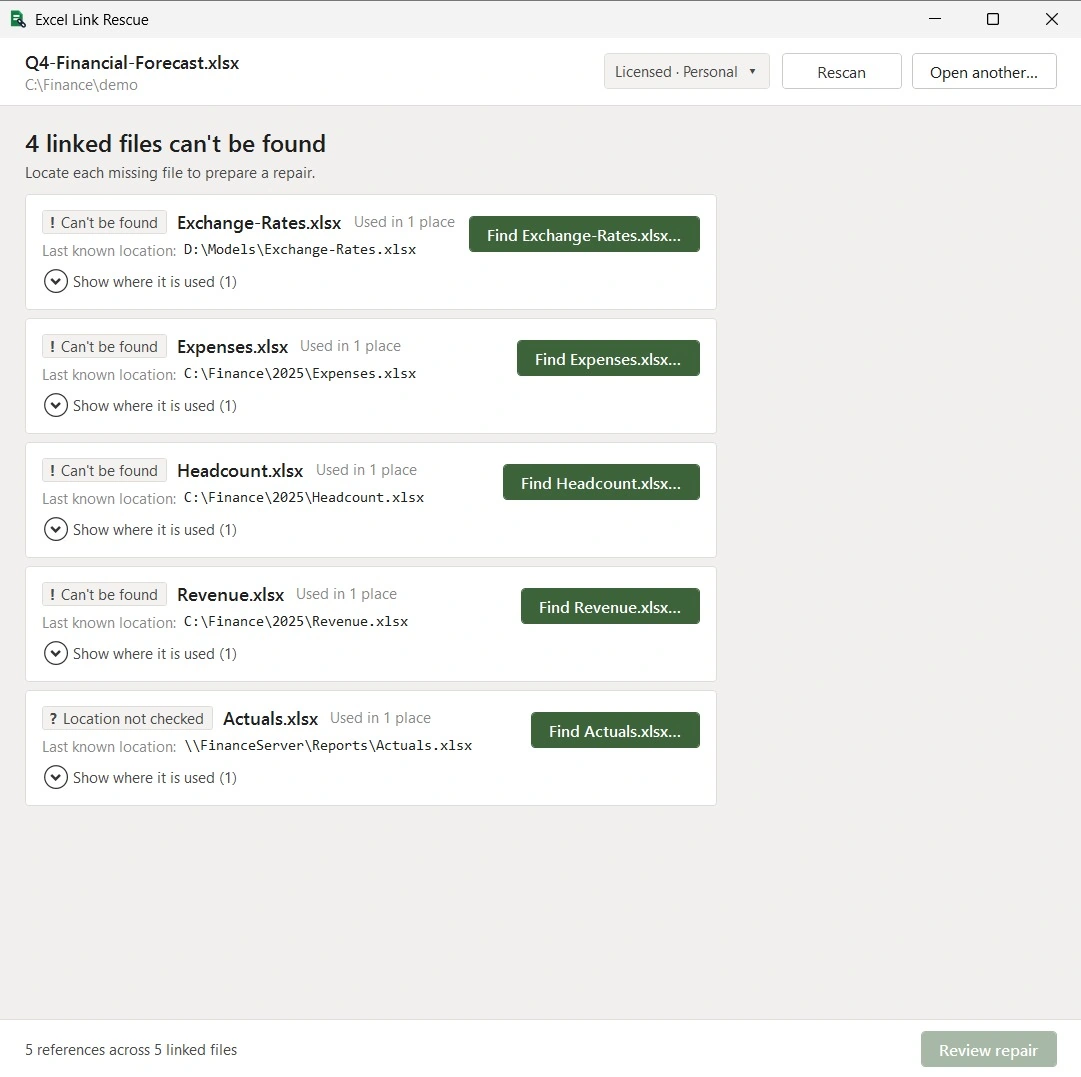
Expanding a source lists the individual references behind it, with the sheet and cell for formulas and the name for a defined name, so you can see whether a link comes from one stray formula or from something the model depends on.
Scanning is free and does not modify the workbook. If you find that sources are missing, the next step is covered in fixing broken links.
What is reported but not repaired
Formulas, defined names, chart references, hyperlinks and the workbook's link entries can be repaired. DDE links, linked OLE objects, Power Query sources, PivotTable sources and data connections are listed in the scan with the reason they are left alone, so you know they exist without the tool changing something it cannot change safely.
Questions
What is an external link in Excel?
A reference from one workbook to another. A formula, a defined name or a chart in your workbook reads values from a different file, and Excel stores that file's location so it can refresh the values.
Why does Excel say my workbook has links when I cannot find any?
The reference is usually somewhere a formula search does not reach. Defined names are the most common, including hidden ones, followed by chart series and the workbook's own link entries.
Does finding external links require opening the workbook in Excel?
Not with Excel Link Rescue. It reads the file directly, so the workbook does not need to be open and Excel does not need to be installed.
Can I see which cells use a particular source file?
Yes. Each source in the scan lists the references that point at it, with the sheet and cell for formulas.
Scan a workbook
Scanning and previewing are free. You can see every linked source file and where it is used before deciding whether you need to repair anything.
Download Free